EARLY ACCESS SUPER TRUCK LIFE

Blog

Weekly Update: Badges, Play, & Bugs

Hi Truckers,

We hope it’s been a good week for ya’ll. It’s been a pretty good week for us, if I’m being honest. While we’re still investigating a few bugs recently brought to our attention (thanks MadManix/Fhajad), we’ve managed to make completely unreasonable headway on a brand new feature I’ll be diving into a bit in this post; Badges.

Badges are what you’re probably thinking they are, if you’re thinking why don’t you guys just call them Achievements like everyone else. We don’t know. Badges just sounded more on-brand.

If you’re not familiar with Achievements/Badges, it’s an incremental reward system with meta-goals. For example, maybe you clicked on 10,000 collectibles and we want to make fun of you applaud you for such a remarkable waste of time accomplishment. Well now we can, with Badges! Also, you’ll earn Badge Points for each Badge you get, which will later be used to get actual stuff you’ll be excited about hopefully!

But don’t take my word for it, take my designs with words in them… for it (as always, these are subject to change):
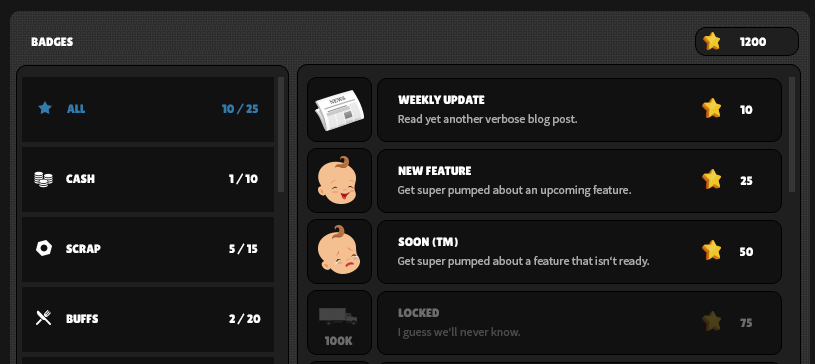
We’ve got categories, a list of badges in that category, and a badge point total. Check out some badge concepts:
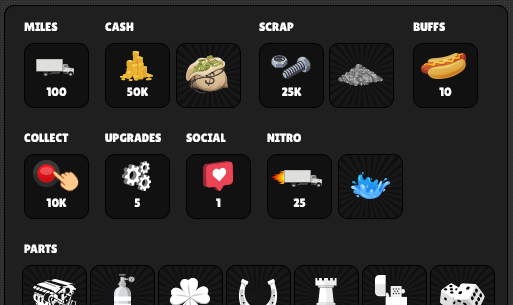
Want to see more? Sure, why not:
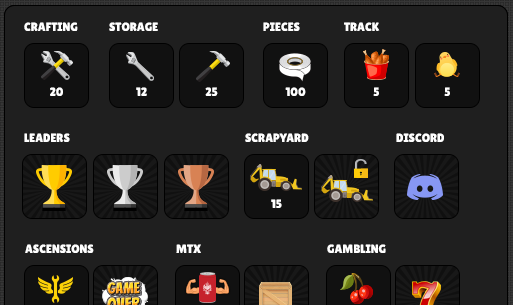
More? Ok, now you’re just being greedy. Seriously though, we don’t want to give away too much, but we’re planning an insane amount of Badges you can earn on launch, so get ready!

We’ll keep you posted on progress as we go. In addition to Badges, Mike and our new dev are working hard to fix some travel ticket bugs and build out a long term solution to the desync issues. We have a pretty good idea what we need to do, it’s just a matter of effort/time.

Finally, I’d like to mention that with the addition of Badges we noticed the left nav was getting comically enormous. From a UX perspective, it made us sad, so I spent the last few days introducing a solution we think you’ll like. This will affect the overall layout to left nav and the play page in general, so when Badges are released into the wild, you’ll get a much needed improvement to the play page as a mega bonus. This solution will also give us some room to breathe in the future and make your nav experience a little less convoluted. We might even embed the blog into the main area so you don’t have to leave the page to read the updates. I know what you’re thinking; revolutionary.

That’s all we’ve got for you today, we hope you’ll stick around and keep providing feedback and having fun. We’ll keep them sweet, sweet updates coming and all you gotta do is keep truckin’.

Clicked Well Over 10,000 Collectibles,

Mike and Dan
Sound, Recipes, Bugs, and More

Hi Truckers,

We did some things. Cool things, we think. Here’s a list of those things:

  • Added sound effects to multiple UI elements including Scrapping, Smashing, and Crafting
  • Added an additional Paint recipe to Ascension 0 (A0)
  • Added two additional recipes to A0 with multiple effects — yay!
  • Added logging to gather a lot more info in real time on travel bugs being reported
  • Added a part-time, trusted dev to the team to help Mike before he literally dies
  • Additional optimization (it never ends, damnit) including scaling the Truck for better clarity

We’ve been busy, and there’s something I’m going to address, so I’d like to put on my serious pants for a second.

There’s been a mild and not-really-worth-addressing disturbance in the force. As we’ve said, we always appreciate constructive feedback and criticism. Seriously, we’ve got thick skin, but referring to the devs as “jerk offs” or the game as “shit” isn’t really that helpful other than making us cry a lot. I mean, we know this game isn’t Skyrim: Browser Edition but it’s A) In beta, B) Updated every week, C) Basically Skyrim Browser Edition so keep that in mind next time you feel motivated to crush Mike’s dreams (jokes on you, mine died years ago). Also, we love ya’ll.

Alright, cool, now that we’re done being weird and my pants are back off, let’s chat about the whole “background tab” thing ya’ll are not at all annoyed about. For those of you not in the loop, running STL in a background tab or minimized is going to cause some problems. Namely, serious desyncs and effectively pausing the game. It is always best to run the game in a dedicated tab/window.

Here’s the deal. Browsers like Chrome and Firefox do something called background tab throttling. Basically, if a browser tab is inactive or minimized, the browser is going to minimize the hell out of the requests in order to save your computer from bursting into flames. For WebGL games, this is kind of a problem, but more of a problem for us for a variety of reasons. Sure, some games still seem to function just fine in those states, but it’s often because those games don’t make that many requests or they simply simulate the progression. The former isn’t the case for us, and the latter is a huge undertaking. We have a race track with generated results. Multiple inventories (crafting, storage, garage). Crates. Friending. Chat. DMs. Notes. Crafting. Scrapping. Smashing. Gifting. Attachments. Multiple timers. Colliders. An actual physics system.

Maybe you read that whole paragraph, maybe you rolled your eyes and didn’t. The short version is, we effectively built an MMO with a social network layer. There are a lot of requests going on and simulating progress is essentially a nightmare. That being said, there are things you can actually try to circumvent these issues depending on your browser:

Let me be really, really clear. DO THIS SHIT AT YOUR OWN RISK. We take 0% responsibility for anything that happens. By that, we just mean if things start running like farts it’s not on us. However, here’s how to disable throttling: https://www.likeitall.com/throttle

Hope that helps. Seriously, I hope it helps. And yes, we’re always working towards alleviating any issues we can. There are things we can do to make things better, but we’re not there yet, and like I said, it’s a huge undertaking.

Oh yeah and also we’re working on Badges (Achievements/Trophies) or whatever for our next big feature. NBD.

That’s all for now, Truckers.

Throttled,

Dan/Mike

Hotfix: Rooks/Lighters & More

Hi Truckers,

So, uh, look, about last night. Our intention was to simply introduce a massive feature (Crafting) and we totally did. It even worked exactly as intended so that’s pretty cool.

What we also did is introduce a few bugs that gave ya’ll mother f’ing hyperthrusters when equipping a measly rook and/or lighter. Some of you went so god damn fast in the first 10 minutes of playing you managed to travel back in time. As a result, this skewed baseline data, leaderboard results, and negated the purpose of resetting progress. To put it less technically; it absolutely f$@#ed things up.

We’ve fixed the major bugs in this totally minor mistake that could have absolutely happened to anyone even us because it did happen to us, but also some bonus fixes as a result (something something silver lining). Also, since we felt really, really bad about having to reset the progress again after ya’ll basically had a night of active cheat codes, we’ve decided to start you with 3 crates instead of one, and we’ve added a new item to the game you’ll now start with — the Jester topper. You’re welcome (?). Anyways, here’s what we did:

  • Looted Rooks/Lighters no longer provide ludicrous power
  • Lighter rarity colors have been resolved
  • Environmental audio has been reduced (66%)
  • Radio audio has been reduced (33%)
  • Scrapyard: unlock button will no longer be available if you don’t have the scrap
  • All / Ready filters in Crafting will now filter depending on your pieces
  • New Recipes reward feature added to Ascension panels (at the bottom)

Your progress will be reset with this patch. Sorry again; this is why we Beta!

Totally Not Our Fault,

Dan | Mike

Crafting is Live!

Hi Truckers,

Roughly a month ago, we mentioned Crafting. Then we mentioned it a few more times. Today, we’re going to mention it again because we did it, damnit; we finally finished the first version of Crafting and we can’t wait for you to Smash the hell out of some Parts/Paints, unlock Recipes, and build some fancy gear! Or just yell at us and tell us Crafting is stupid and dumb and give us ways to make it better. That’s cool too. And since we don’t half-ass anything, we’re launching this new feature with almost 60 Recipes. Damn!

As a reminder, your progress will be reset with this update. Anything you purchased in the Shop will be retained.

Here’s a quick summary:

  • Crafting has been added to the left nav
  • You can Smash (not Scrap) Parts/Paints in Storage to get Pieces
  • Filter and find Recipes in Crafting
  • Craft Parts/Paints with Pieces
  • Unlock new Recipes with Ascensions
  • Profit (somehow?)

Protips:

  • Hover your cursor over a Piece for more info (where it drops, etc)
  • Some pieces are more rare than others when smashing Parts/Paints
  • Some recipes are only available after you ascend
  • Some pieces can only be obtained after you ascend

And before you ask, yes, some Recipes craft Parts with multiple effects. You asked for it; enjoy!

We are aware of some inconsistencies in labels and formatting — we’re working on it.

Feel free to provide as much Feedback as you like; we’ll be listening! Once Crafting v1 is locked down based on any needed fixes/tuning, we’ll be working on balance/polish and additional Ascensions in the near future. Right after we take a quick whiskey nap.

Sleepy Bois,

M/D

Weekly Update: Bug Fixes & Crafting

Hi Truckers,

We know a handful of you have experienced a desync in one way or another. This includes negative values in cash and/or scrap. The short version: what you’re seeing in your wallet and what actually exists in the database are two different things. Occasionally, you might see a positive value but then something will trigger a negative again. The longer this issue exists, the more out of sync things get, until what we know you have is nowhere close to what you think you have in your wallet. One of the major culprits was based on a post-ascension bug, which is now resolved. We also manually updated the player accounts currently affected; it won’t be exactly what you had but we’ve added some bonus funds as an apology for the inconvenience. We also fixed some login issues players were experiencing. While we’ve tested these fixes internally as much as possible, we’ll need your help to find any edge cases that need attention!

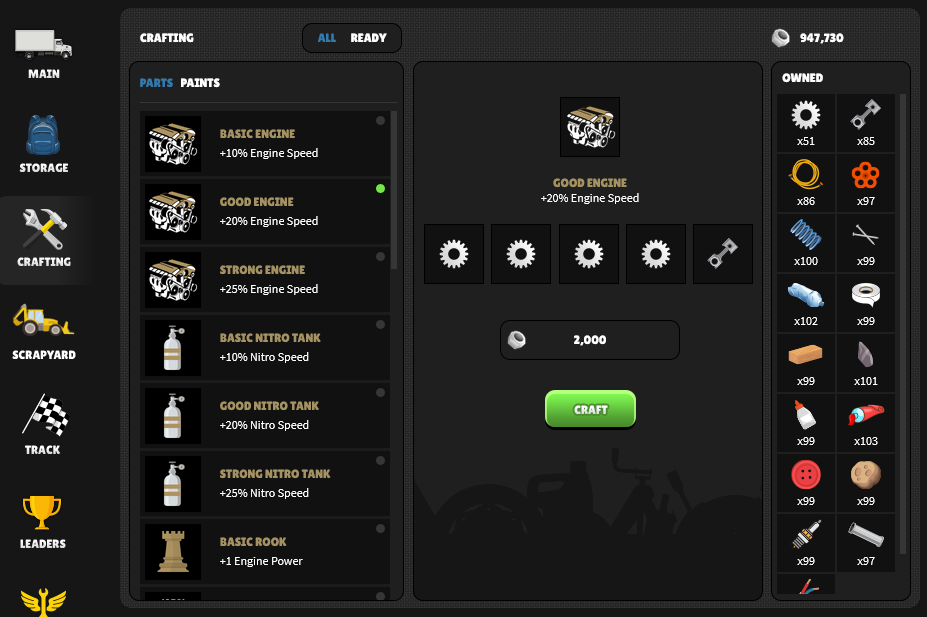
With that (hopefully) resolved, let’s get back to Crafting. Only this time, instead of those weak-ass Photoshop screens, how about we take a look at the actual staging server:

Recipe selection:

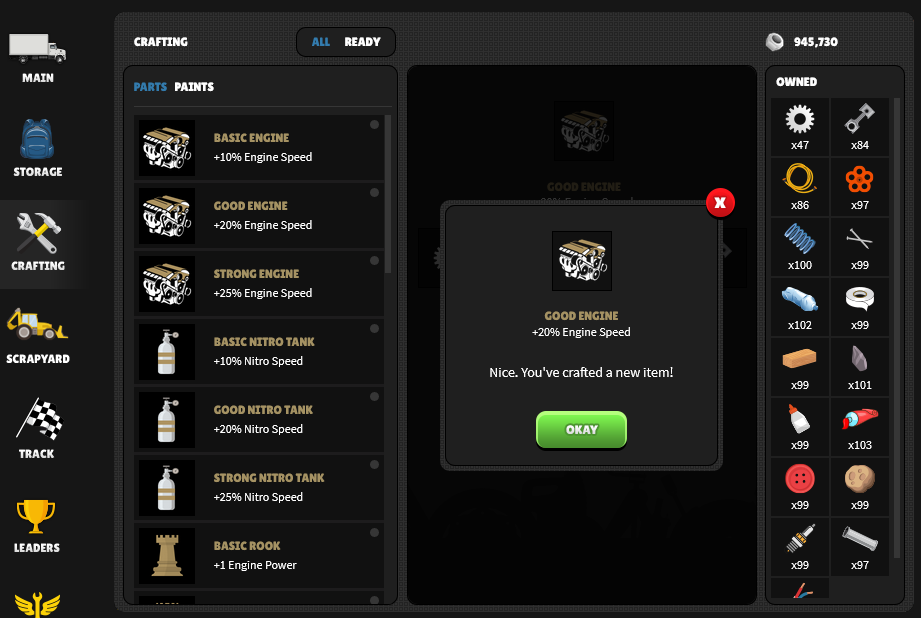
Crafted:

That’s the entire crafting process, in three simple screens. But how do you get all those sexy pieces, you ask? I’ll show you:

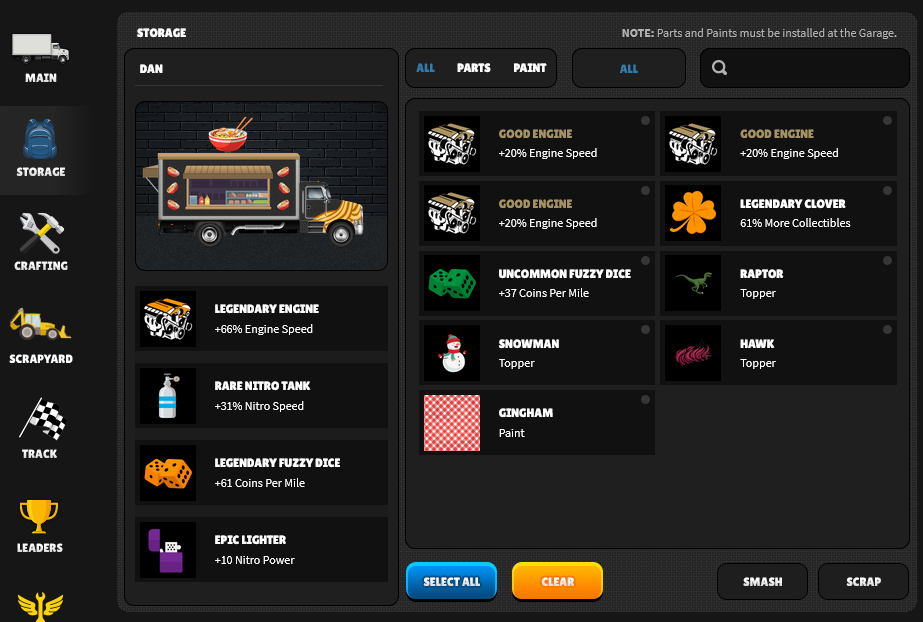
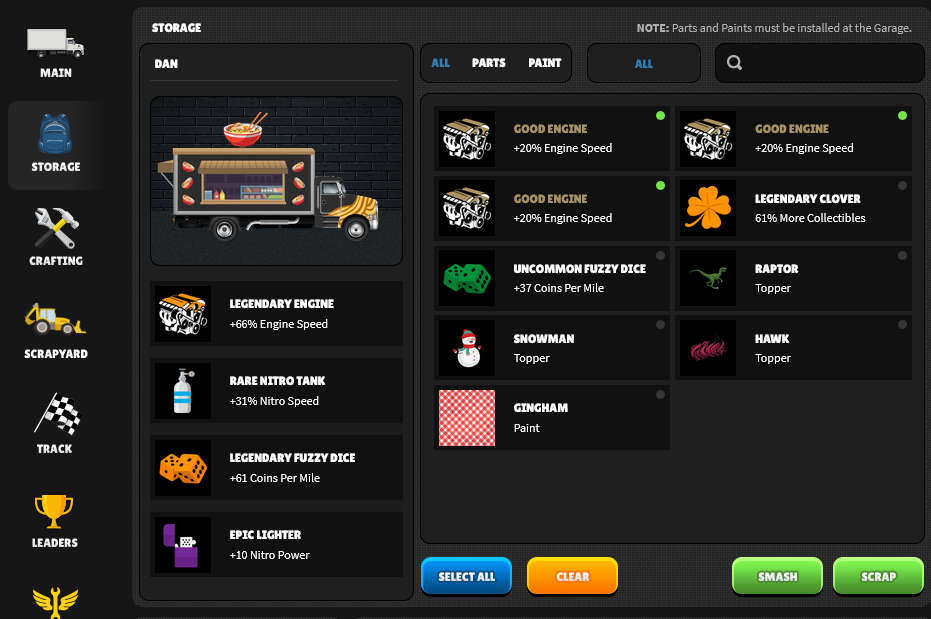
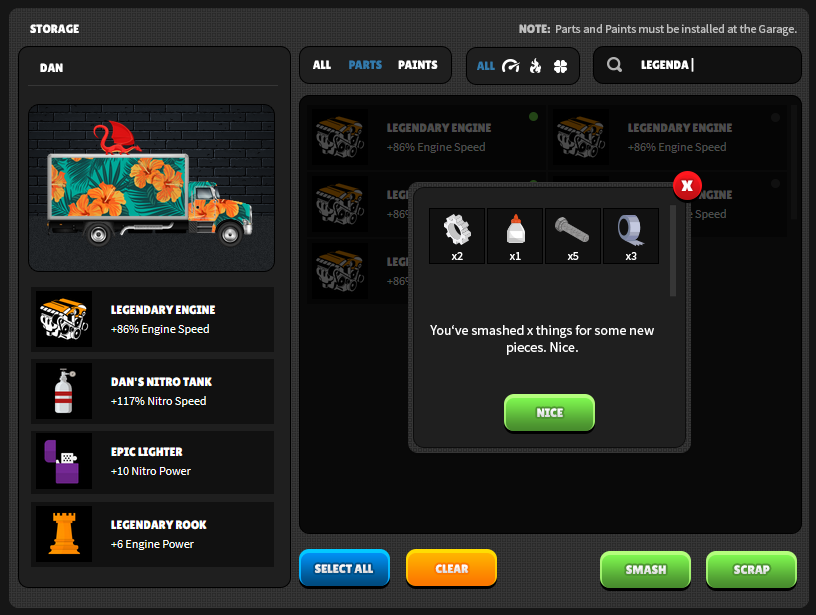
By Smashing shit, of course! You’re all familiar with Storage, but now you have two options; Smash or Scrap. Let’s select the new parts we just made:

Time to Smaaaaashhh:

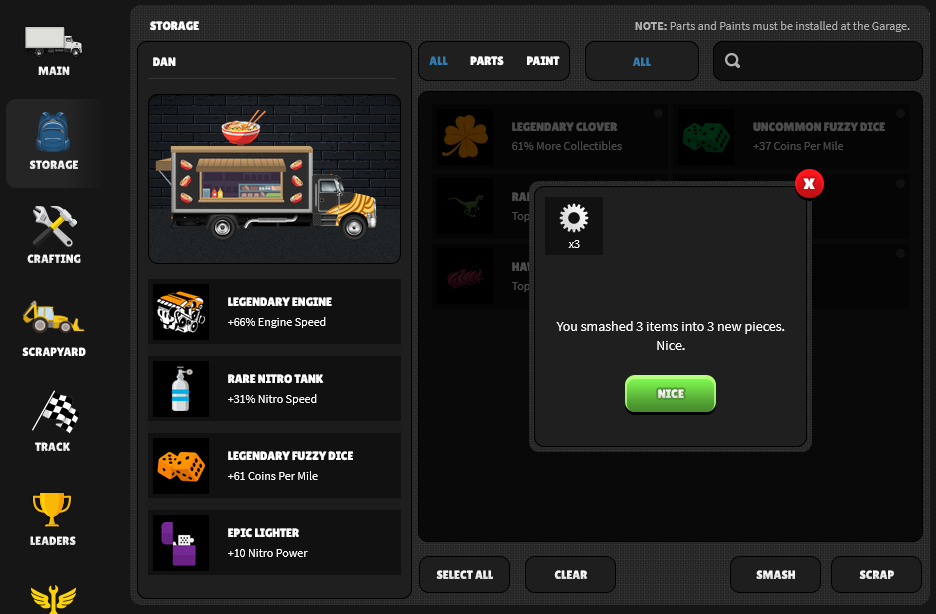
Smashed:

That’s it! Smash Parts/Paints, get Pieces. Use Pieces in Recipes. Smash again. Crafting!

Now that we’re in testing, it won’t be long before you’re Crafting your very own Parts (and Paints) from 20+ Recipes (for now). Could be next week, even. Also, now is probably a good time to mention:

We will be wiping the server when Crafting goes live.

Please keep that in mind. In addition, any purchases made in the Shop will be retained through the wipe. For example, if you bought Auto Nitro and 10 Crates, you’ll have Auto Nitro and 10 Crates ready to open from the beginning of the game. You won’t lose anything (although we can’t guarantee the contents of the crates)!

That’s it for now. Keep an eye out for more updates, and hit us up in Chat or Discord. And yes, we read chat and Discord daily, even if we can’t always respond. We know the bugs ya’ll have been experiencing lately have been frustrating; we get it. We’ll continue to bust our collective asses to keep things on the level, sometimes it just takes a few minutes as a two-man army. Thanks for all your feedback!

Crafting Crafting,

Dan & Mike

Weekly Update: Crafting and Roadmap

Hi Truckers,

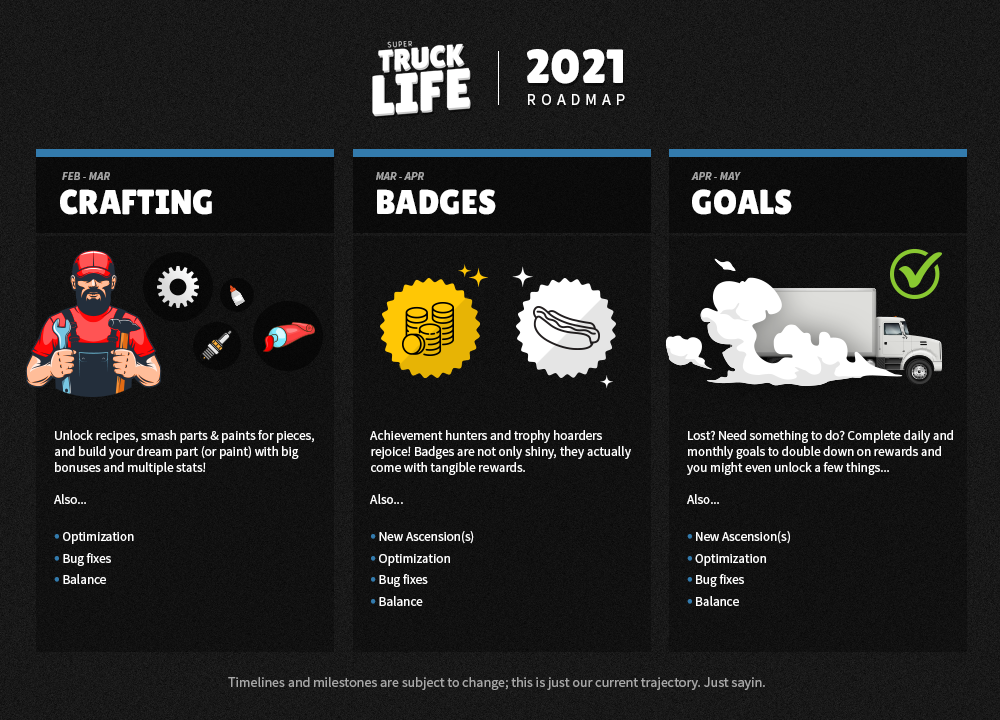
Another quick update this week, but this time with a super helpful roadmap graphic because words are boring and stupid. In case you haven’t already guessed, we’re still working on crafting, but we’re getting close™. Mike is currently wrapping up the functionality, then we jump into internal testing where we attempt to break absolutely everything until Mike cries into a puddle of mango-scented White Claws. Like I said, close. In the meantime, we slapped this little piece of transparency together for those of you wondering what our roadmap looks like:

As you can see, crafting is slated to be complete sometime in the next week or two with badges coming up next. The graphic should speak for itself, but I should point out at some point while working on Badges we’ll be adding ascensions. Those of you that are grinding the Endless Road into space dust, get ready for more content next month!

If you have any questions/concerns/comments/amazon gift cards you’d like to throw our way feel free to let us know in the Discord or chat.

Also, shout out to the French players that have recently joined the beta. Salut! We don’t speak French, but we’re happy to use Google Translate and do our best. I had to watch a 3 minute video on the formal vs informal greetings in French so I’m looking forward to embarrassing myself. Should be fun.

We’ll keep you posted on everything else and of course, keep the feedback coming!

Close,

Dan&Mike

Weekly Update: Crafting

Hi Truckers,

Today we’re gonna talk about crafting. This post will be broken into two parts; the what and the why. The former is a deep dive into the crafting process from start to finish. The latter is a simple explanation as to why we’re so focused on crafting in the first place and prioritizing it above other things (new Ascensions, for example). Let’s get started!

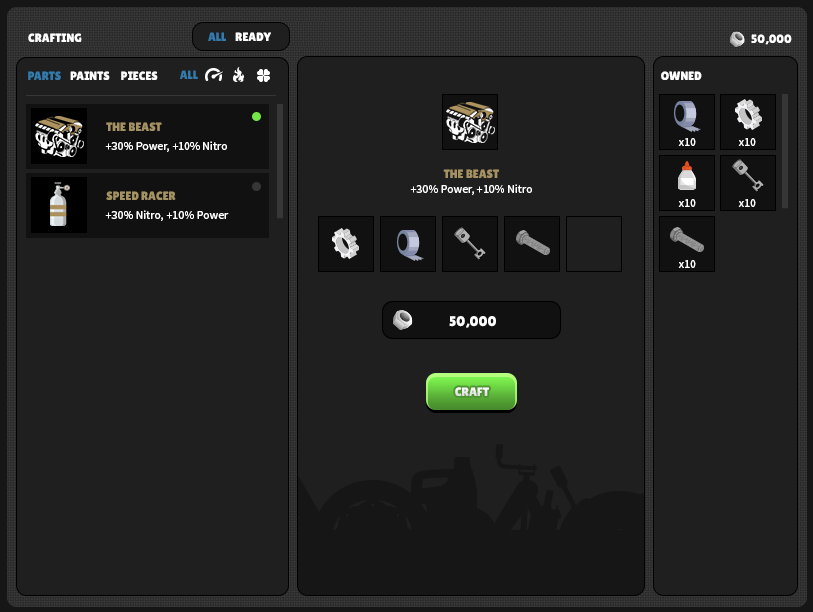
Last week, we provided an overview of the crafting layout. This time, let’s start from the beginning and Smash (not Scrap!) some Parts:

Notice there’s now a “Smash” button next to the Scrap button in the Storage panel. After tagging one or more Parts/Paints you’ll have the option to either Scrap or Smash them. Scrap = Scrap. Smash = Pieces:

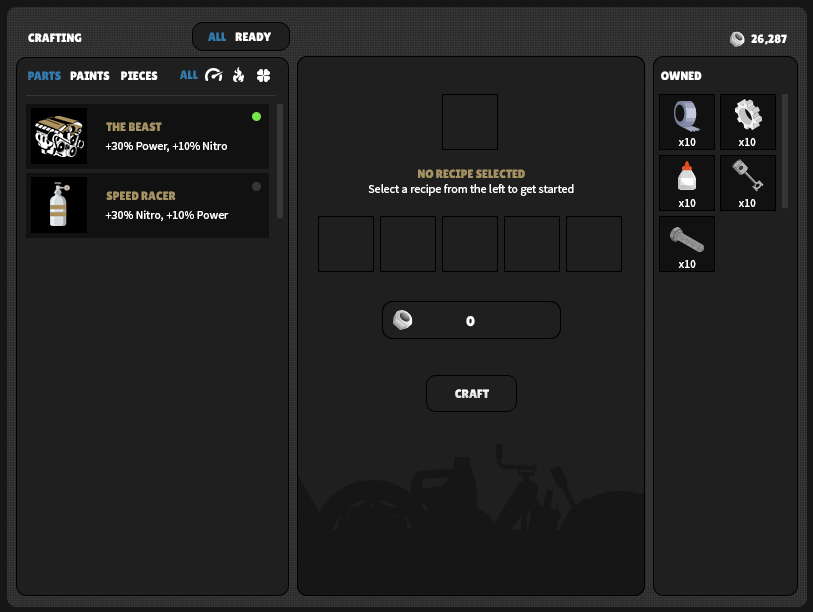
Now that we’ve Smashed a few Parts, we’re ready to get into some Crafting! Switching to the Crafting panel will look something like this:

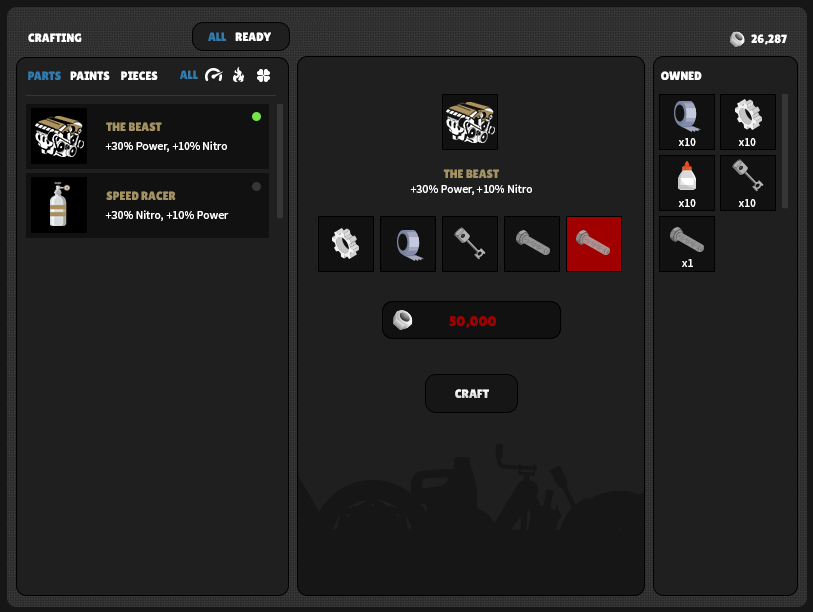
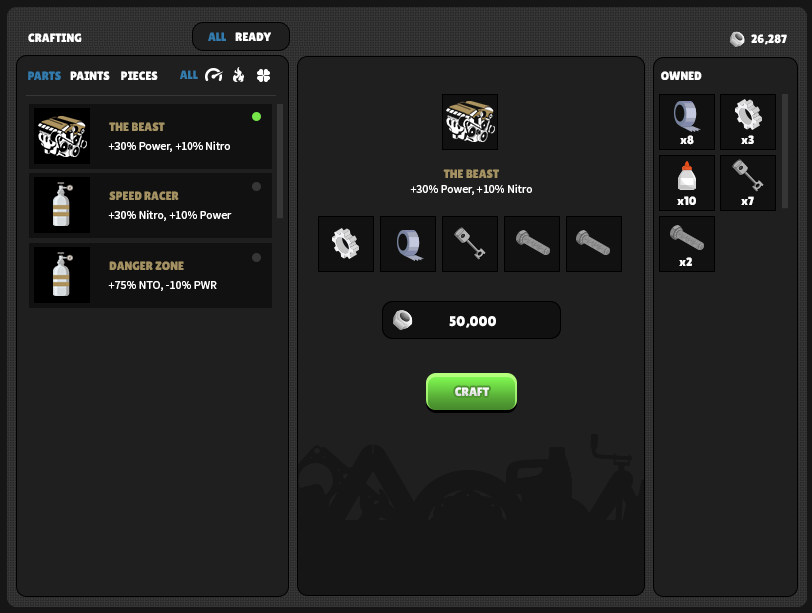
As we said in the last post, the three columns are Recipes, Current, and Pieces owned. In that shot, we have yet to select a Recipe. Once selected, we’ll automatically fill in the required Pieces for you assuming you have them (and the Scrap required). If not, you’ll get something like this:

You only have 1 bolt, but the recipe requires two. Notice the very subtle red background behind the missing piece, and the craft button is now unavailable. It also looks like you’re short on Scrap. Shame. Let’s fix that:

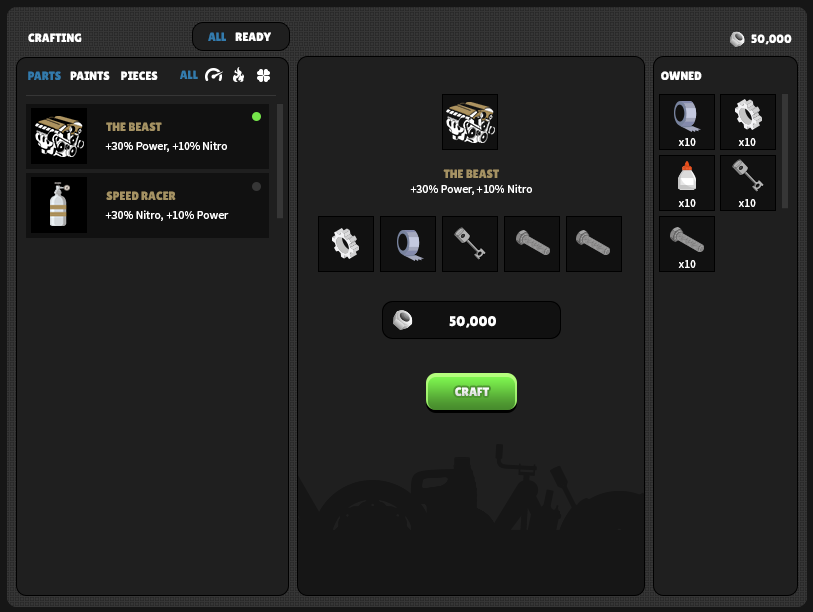
Wow, you now have more bolts and exactly 50,000 Scrap. Thanks, Photoshop me.

Before we crush that Craft button, it should be noted that some recipes only require 3 or 4 parts:

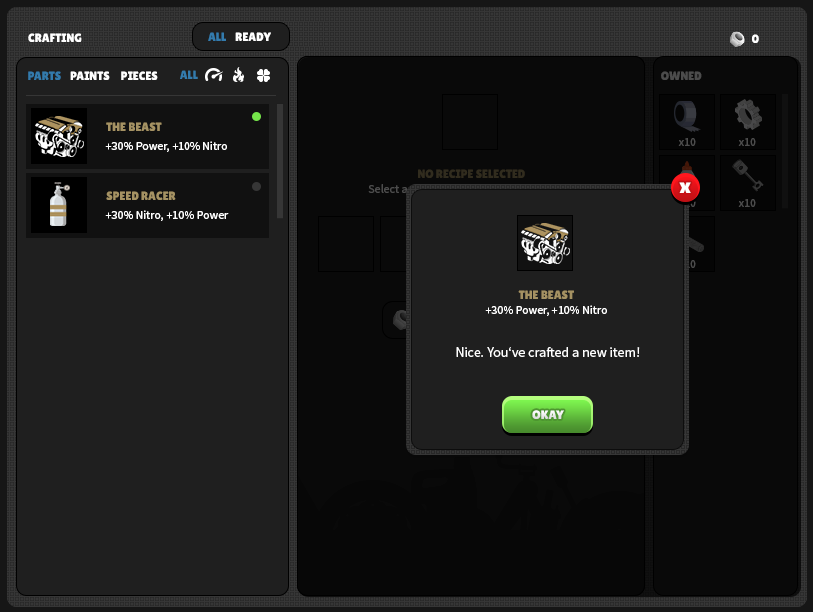
Anyways, we’re all good to build The Beast! Let’s go:

And that, Truckers, is Crafting in a nutshell from start to finish. As we approach launch, we’ll dive into some actual Recipes and Pieces. If you’ve got questions feel free to drop in the Discord or game chat and ask away!

Now that we’re done with the visuals, let me explain why we’re so adamant about getting this Crafting thing built (crafted?). In short, this is what Crafting will do for STL:

  • New loot tier: Crafted
  • New loot category: Pieces
  • Increased diversity in loot (multiple stats)
  • Player agency (control)
  • Increased scrap value
  • Long-term goals: Recipes and Rare Pieces
  • Ascension unlocks: Recipes
  • Events

That’s a lot of things built into one feature, but that’s kind of the point. We knew Crafting would really tie the room together, but we needed other systems in place before it made sense. Also, it’s not a small feature. We’re moving as fast as we can and we’ll keep you updated but it’s not done just yet. We’ll probably crush a bug here and there, optimize the game, and maybe slap some balance around, but Crafting is our primary focus for the next big patch. Thanks for your patience 🙂

Stay Crafty,

Dan/Mike

Collectibles, Bug Fixes, and Crafting (Sneak Peek)

Hi Truckers,

We’re pumped to bring you our first Tuesday patch. This one is, shockingly, all about collectibles, bug fixes, and a sneak peek at Crafting (name pending). Why don’t we start with a much requested change:

  • Collectibles are even slower, and will not change speed regardless of your Truck’s speed. If we slow them down any more they’re going to start going backwards 🙂

Also, check out these super fun bugs we squashed:

  • Storage icon no longer available when paints panel is open at the garage
  • You can now eject toppers and paints; click on the topper/paints above the truck preview
  • Fixed a condition where AutoNitro would fire while off screen
  • Fixed a bug where you were able to access the Garage & Diner while driving (sorry)

With that out of the way, let’s talk Crafting. I’ll spare you the exposition and get right to it; Crafting is #$@%ing complicated. There are a million things to consider, so we considered them. For hours on end. We sketched and wireframed and cried and drank until things started to click. Then they clicked:

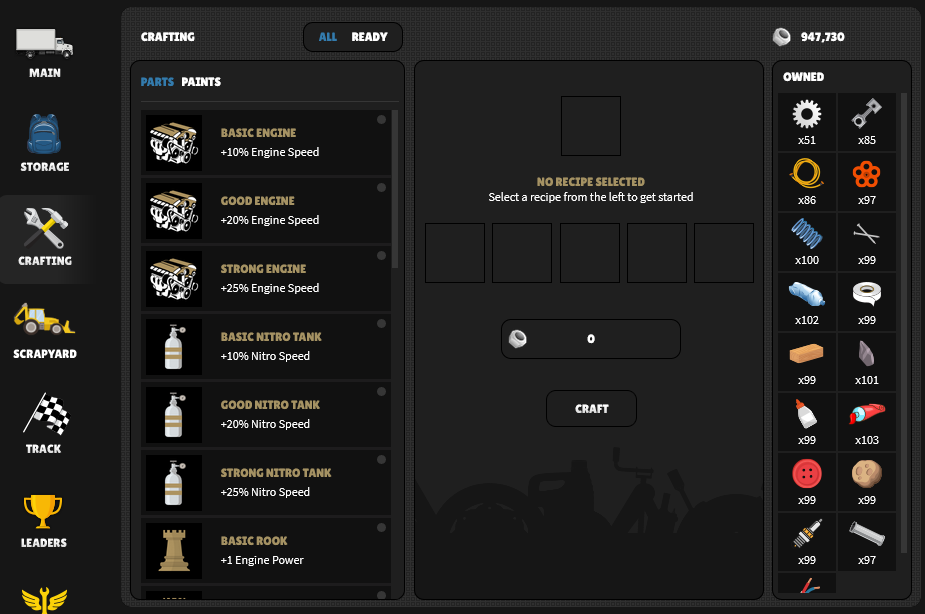
On the left, you have recipes/blueprints with various sorting options. You’ll unlock/earn these as you go.

In the middle, once a recipe is selected, slots are auto-filled depending on your Pieces inventory. If you don’t have the Pieces or the Scrap, you can’t craft the recipe.

On the right, your Pieces. These Pieces are obtained by “Smash(ing)” Parts and Paints. You will now be able to either Smash or Scrap in Storage when selecting one or multiple items. Smash gets you Pieces, Scrap gets you Scrap.

Like I said, Crafting is #$@%ing complicated, or at least it was until we started to put the Pieces together. Haha, Pieces. Help me. We’ll provide more details as we get closer to launch!

Crafting is going to take a little while, but in the meantime you can always count on us for consistent delivery and transparency every week even if the patches aren’t massive. As always, thanks for sticking with us and keep the feedback coming.

Crafty af,

Danny & Mikey

Optimization Patch & Next Steps

Hi Truckers,

This week we focused on optimization. We’ve been having a little too much fun building out new features (no regrets) but we know players are still experiencing some desync issues or issues commonly resolved with “refresh to fix it” aka “resync.” We also know some players are experience sluggishness across the board, including stuttering when opening a crate, delayed button feedback, and other anomalies. While this is expected in a beta, we’re also considering these issues being present when this isn’t a beta and our player numbers have increased substantially. What then? Slap some Flex Tape on that shit and hope for the best? Probably not the best call. Basically as it stands we have an insane amount of calls going to our server even with a limited group of active players. The second we scale up… boom.

Instead, we added a new redis (Remote Dictionary Server) cluster to our system and began aggressively caching key points of our back end. You don’t really need to understand any of that hot nonsense. All you need to know is that this is us trying to fix a whole bunch of issues mentioned above, make everything faster in general, and lock this down before we open the floodgates. Smash that refresh button to check it out.

We know this isn’t the most fun you’ve ever had after a patch. We’re sorry about that, but while slogging through the mud to get that built out, we started discussing and designing an entirely new feature in the works; Crafting. I can’t do a deep dive just yet, but know this is going to be a robust system with multiple pieces (components), recipes, and yes even Parts with multiple stats (+10 Power, +10 Coins/Mile). That’s all I’m going to say for now. We’ve already started actual layouts, and spent like an unreasonable amount of time discussing details. We’re pretty f#$%ing pumped.

As always, feel free to let us know if this patch tickles your pistons or whatever really weird truck-based euphemism you want or don’t want to use. Things should absolutely feel smoother, but we can’t really know that until all of you are testing simultaneously; there are only so many Dan/Mikes on our end (you’re welcome). Hopefully with this massive stride towards optimization we can get back to making the game “fun” and stop worrying about it being “playable,” like that even matters.

Lastly, one thing of note: we’ll no longer be patching over the weekend unless there’s an emergency. We’ll be switching to patching on Tuesdays starting on Feb 9th. That is all 🙂

Fully Optimized,

D/M

Storage is Live!

Hi Truckers,

This week’s patch is going to make your lives a lot easier, especially those of you that love to hoard every single mf-ing paint/part you get your hands on. You might have noticed some sluggish inventory loads and/or an overall lack of motivation to clean house when your inventory is an unapproachable dumpster fire. Fear not friends, your bois at STL have spent the majority of their efforts this week speaking in third person and making inventory management a hell of a lot easier. First, let’s discuss the goals of this new feature:

  • Increase inventory load speed
  • Provide player with filters and search tools (agency)
  • Expand on parts/paints UI and give player more visibility
  • Add quick comparison to current parts/paints
  • Add ability to select multiple parts/paints at once
  • Add ability to select/deselect all
  • Add ability to scrap all selected in bulk
  • Allow player to scrap while on the road
  • Allow player to view parts and paints while also, on the road
  • View your truck, a friend’s truck, gift, and dig through inventory simultaneously
  • Reduce server load across the board

Done. Introducing Storage. Directly below your Main icon on the nav you’ll notice a little blue backpack:

I hope something awesome doesn’t happen when I click on it:

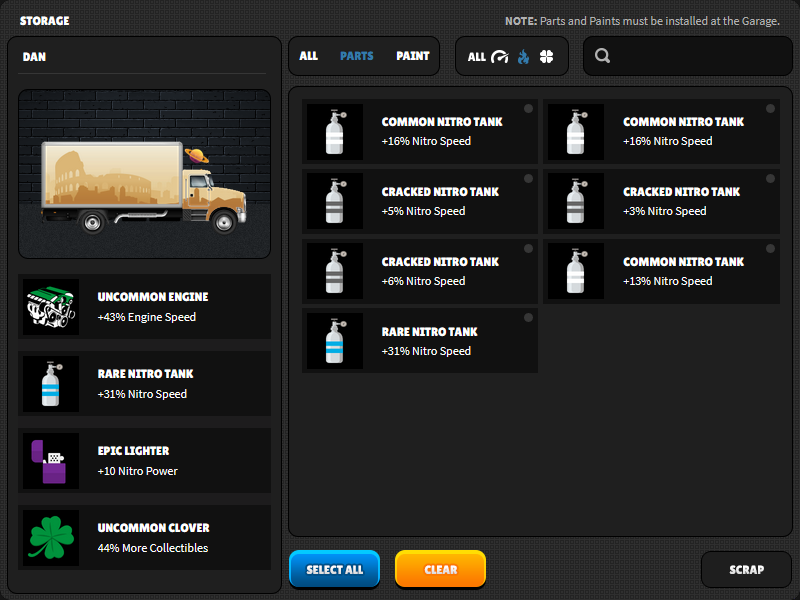
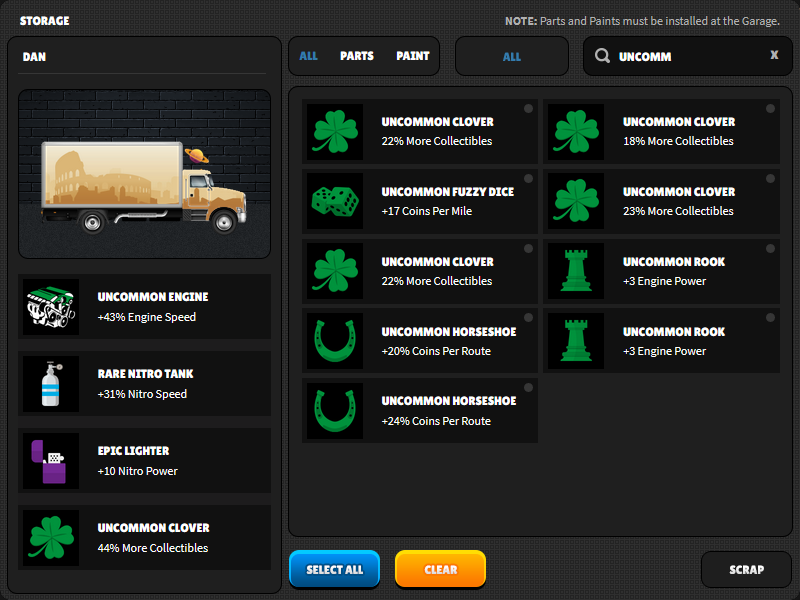
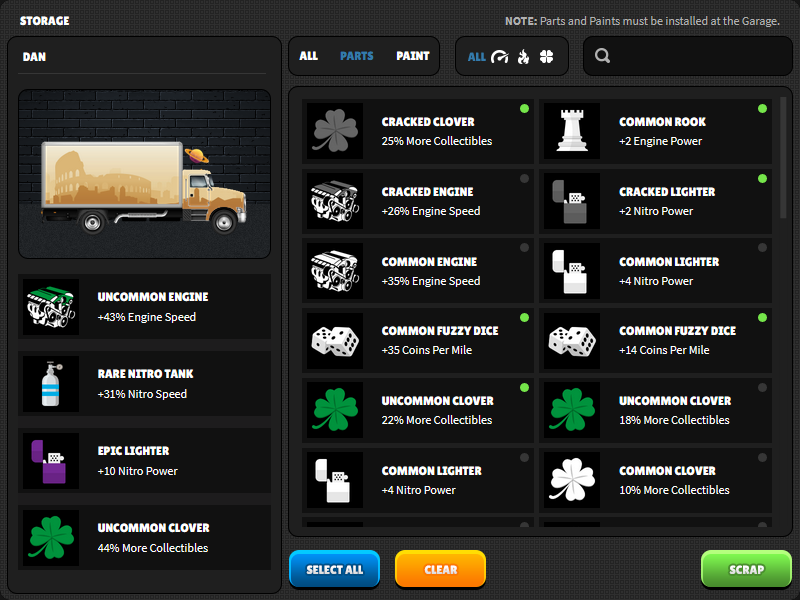
Oh no something awesome happened. Welcome to the main Storage screen. Let’s break it down. On the left is your name, truck appearance, and your installed parts. On the right, is… everything. It’s literally everything in your entire inventory. This includes all parts and paints. You can easily switch the filters. For this example, let’s filter just nitro tanks:

Amazing(ly predictable). You can filter paints, parts, and different kinds within. We know what you’re thinking though; what about my 200 sorting options? How can I find things specifically. Sorry, that’s just not something-

We did that, too. We’ve included a real-time auto fill search option so you can basically sort by whatever your weird imagination can come up with. You can even search by the descriptions such as “collectibles” or “per mile.” The possibilities are Endless (Road).

Speaking of which, you’ll notice the Select All, Clear, and Scrap buttons on the bottom. Yeah that’s right…

You can mass scrap. You can multi-scrap. You can pick and choose different paints and parts and then scrap em all. Pack it up bois, we did it.

Let’s try it out! First I’ll click a few random parts (notice the little green dots on the parts, and the Scrap button becomes available):

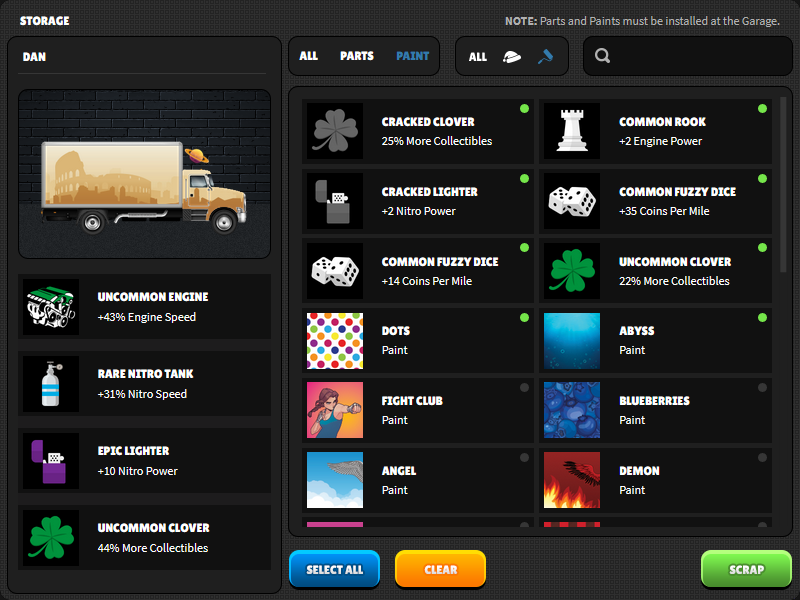
We’re not done yet. Let’s jump over to some paints and scrap a few of those too:

Notice the filters changed, and I selected a few paints, but the previously selected items tagged for scrap are stuck to the top? Pretty convenient, right?

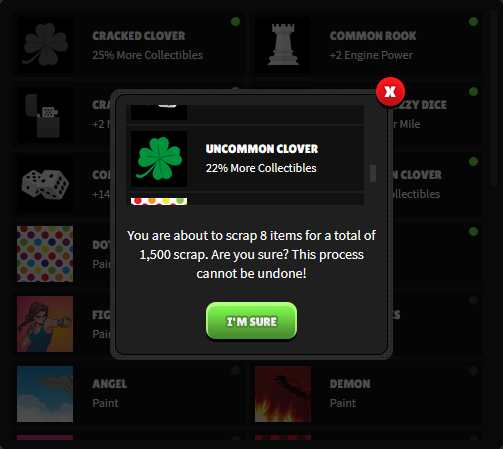
Now that we’ve got 8 items all selected, let’s get to scrappin:

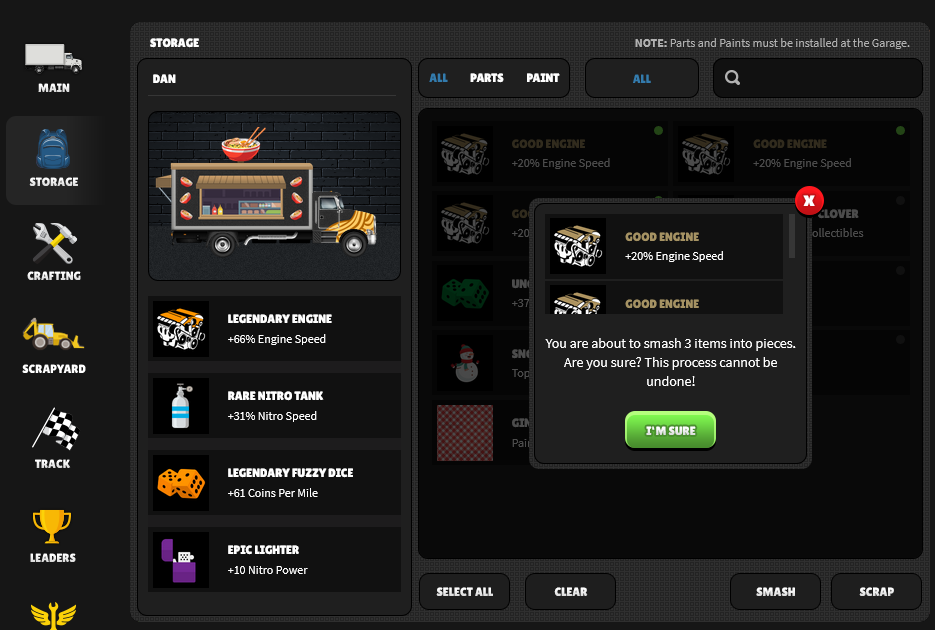
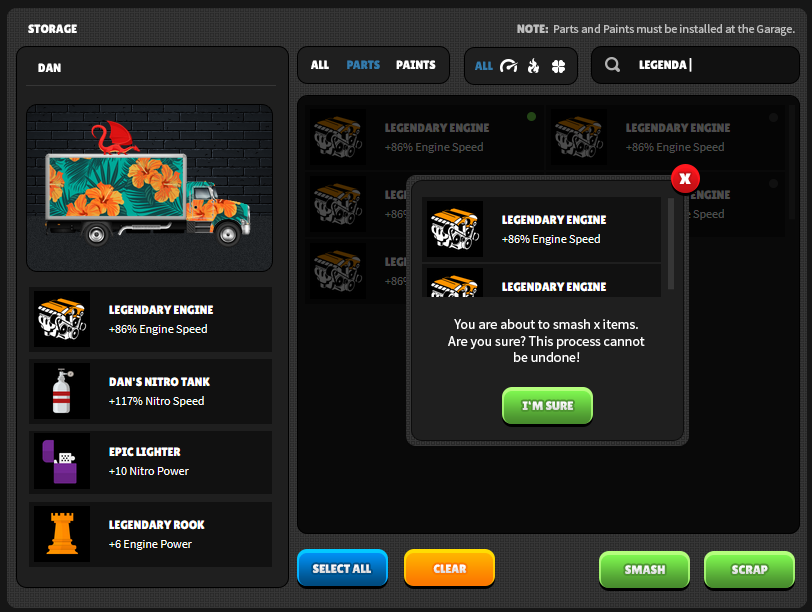
You’ll get a little box asking for confirmation with all selected items in a scrollable list, the number of items, and the total scrap! Holy shit!

If you change your mind, you can click the X to close the window, then hit “Clear” or unselect specific items. And that, Truckers, is your intro to Storage.

Now, we should probably mention one caveat, and one known issue. The caveat is, you cannot access Storage and Garage Parts/Upgrades at the same time. You can, however, access Storage and Garage Paints at the same time, because that’s known issue. We wanted to prevent people from bouncing between the two because things aren’t always going to update immediately and it could get confusing. In the next patch, we’ll make sure it updates on the fly so just wait a week or so and this whole paragraph is pointless. Awesome!

You’re going to feel the game move just a little faster, inventory should be a lot more agile, and Storage should ease those inventory woes. We know this has been a major pain point for some of you and we hope this helps. Next week we’ll focus on the laundry list of bugs and things that are way less fun for us, including making this Storage thing just a little (lot) better. We hear you, we’ve got our punch list and we’re prioritizing every day. Thanks for playing, and keep that feedback coming!

(Inventory) Management,

M&D